Tutorial videos for B2B SaaS help centers

Help-center videos that never show an old UI.

We make short product tutorials for your help center, then check your UI every week. When a screen changes, we re-record and re-voice the affected videos. You approve. You never record or edit anything.

50–90 s per videoVoice-over synced to clicksWritten guide included
Weekly UI checkExample · Mon 06:00 UTC
  1. invite-a-teammateunchanged
  2. create-first-projectstep 3 changed · re-recorded
  3. connect-slack-integrationunchanged
  4. export-report-as-csvbutton renamed · re-recorded
  5. set-up-billingunchanged

The demo

Same video. Old UI, new UI. Under nine minutes.

First, a tutorial recorded against an earlier version of an app. Then the same video after the interface changed and Currentcut regenerated it: new screens, new voice-over, no manual work.

Before → after, regenerated automatically8.8 min of machine time

And the written guide, from the same recording

Every video comes with a step-by-step article: numbered steps and a screenshot of each click with the button outlined. Paste it under the video in your help center. When the UI changes, it is rebuilt with the video.

Open a sample guide
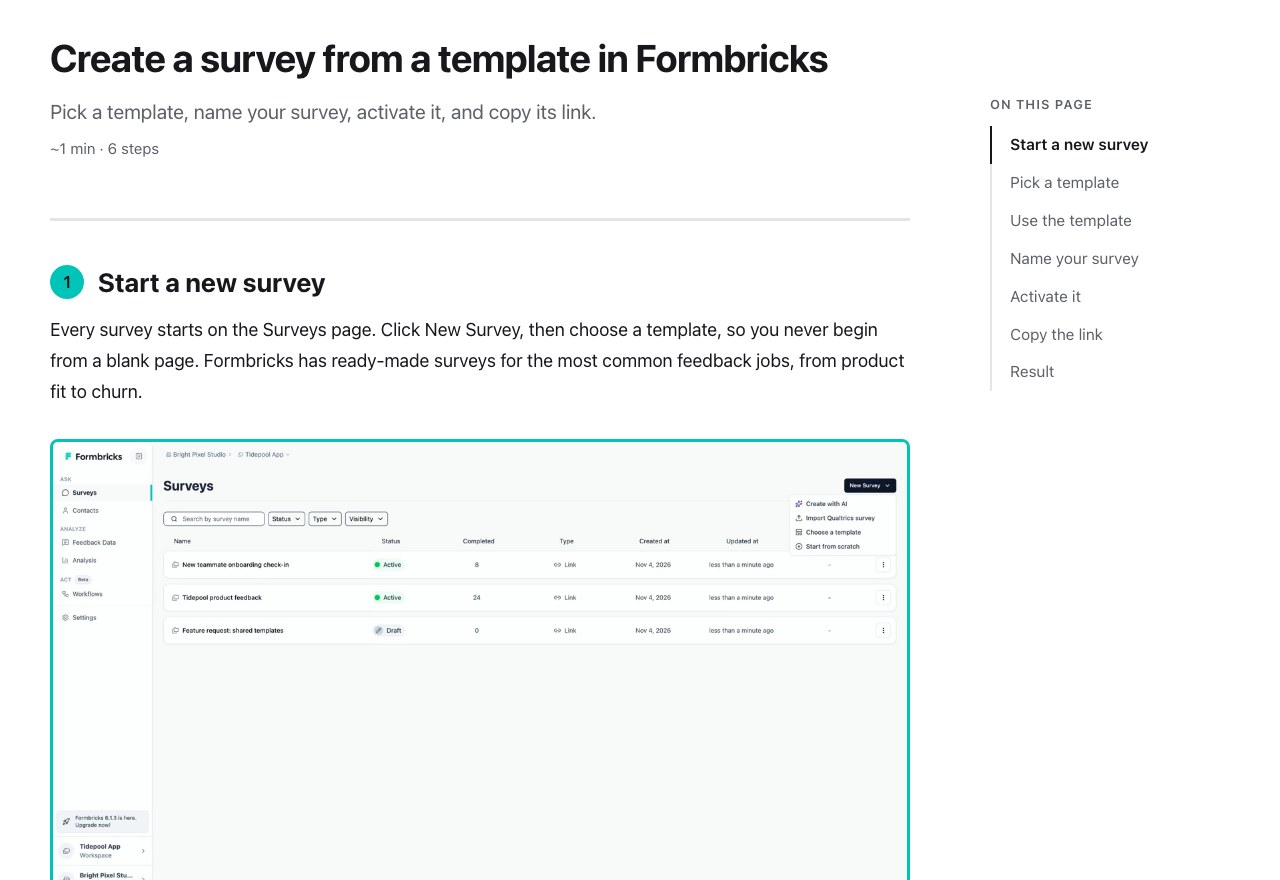
Sample written guide: Create a survey from a template in Formbricks, step 1 with a screenshot

The problem

Every release makes your help center a little more wrong.

A few articles have a video, recorded once, back when the screen looked different. Then the navigation moved and a button got renamed. Now the video shows a product that no longer exists, and nobody wants to re-record thirty videos every sprint.

Videos go stale quietly

Nobody notices until a customer writes in: “that’s not what I see.”

Re-recording is nobody’s job

Hours of scripting, recording, voice-over and editing, out of date again next month.

Capture tools half-solve it

Step captures are quick to make, then go stale the same way. You still have to find each one.

How it works

Three steps. None of them on your side.

  1. 01 · record

    We script and record your flows

    You give us a demo account and the tasks users struggle with. We write each script from your help-center wording, you approve it, and we produce a 50–90 second video: your app in a clean window, smooth camera, voice-over synced to every click.

  2. 02 · check

    We check your UI every week

    An automated check replays each flow against your live product and compares every step with the last approved version. Unchanged flows are left alone; noise such as timestamps is masked.

  3. 03 · refresh

    We re-make it, you approve

    When a screen differs, the affected video is re-recorded and re-voiced. You approve it or request a change in a one-minute form, and we deliver the new file.

Every video includes

Made to sit inside the article that explains it.

One task, 50–90 seconds

Short enough to watch before reading, specific enough to answer the question.

A consistent studio look

App window on a clean background, smooth zooms, an easy-to-follow cursor, your logo and accent colour.

Synced voice-over

A natural neural voice reads the script you approved. Other voices and accents on request.

Files you own

MP4 and SRT captions for every video, ready for Intercom, Zendesk, YouTube or any CMS.

A written guide with every video

The same flow as a step-by-step article: numbered steps and a screenshot of every click with the button outlined. Paste it under the video. When the UI changes, it is rebuilt with the video. See a sample guide.

Pricing

Start with one project. Keep it current with a plan.

Every scope below is fixed, so you can book with a 3-minute form. Booking takes no payment: we reply within one business day with the flows, the delivery date and the price, and you pay once you have approved that scope, before work starts. A call is optional.

One-off projects

Free sample

No login needed
$0

1 video · about 5 business days

What's included
Videos
1
Delivery (business days)
~5
  • One flow we can record from a free signup or public demo
  • We pick it from your help center, or you name one
  • Yours to keep. One per company
Ask for a sample

Pilot

New videos
$490once

5 new videos · 5 business days · free fixes for 30 days

What's included
New videos
5
Product areas
1
Delivery (business days)
5
Extra video
$120
  • For one area, e.g. onboarding or one feature
  • Written step-by-step guide with every video
  • You approve every script; 1 revision round per video
  • Free fixes for 30 days, even if your UI changes
  • 90 days of UI watch: we tell you when a video goes stale
Book a Pilot

Refresh

Old videos, new UI
$490once

5 old videos re-made · 5 business days

What's included
Videos re-made
5
Delivery (business days)
5
Extra video
$90
  • Send links to the videos that show an old UI, in any format or length
  • A long video is split into short ones; each counts as one
  • Written guide with every video
Book a Refresh

Redesign Sprint

After a big release
$1,490once

Up to 15 videos · 10 business days

What's included
Videos, new or re-made
≤ 15
Delivery (business days)
10
Extra video
$90
  • New navigation, new editor or rebrand: the core flows redone in one batch
  • Written guide with every video; 50% off for plan customers
Book a Sprint

Plans: we keep your library current

Keep Current

Maintenance
$290per month

or $2,900 a year (2 months free)

Up to 10 videos kept current · weekly check

What's included
New videos
0
Videos kept current
≤ 10
UI check
weekly
Update after a change (business days)
5
  • For a library we made in a Pilot, Refresh or Sprint; videos and guides kept current
  • Extra new video $120
Book Keep Current

Starter

Most teams
$790per month

or $7,900 a year (2 months free)

5 new videos, then 2 a month · up to 15 kept current

What's included
New videos in month 1
5
New videos each month after
2
Videos kept current
≤ 15
UI check
weekly
Update after a change (business days)
5
  • Re-records, re-voicing and guide updates after UI changes included
  • Unused new videos do not carry over
Book Starter

Growth

Large help centers
$1,490per month

or $14,900 a year (2 months free)

10 new videos, then 4 a month · up to 40 kept current

What's included
New videos in month 1
10
New videos each month after
4
Videos kept current
≤ 40
UI check
weekly
Update after a change (business days)
2
  • Premium voice included; videos and guides kept current
  • We recommend a 15-min call to pick the flows
Book Growth

Add-ons

Extra new video (plans, Pilot)
$120
Extra video kept current, above your plan
$20 / month
Premium voice library (plans / one-off projects)
$50 / month · $50

From a project to a planSubscribe within 30 days of a Pilot, Refresh or Sprint: its videos are kept current from day one and $490 is credited against your first payment (Starter month 1 is then $300).

Billing and cancellingPrices in USD, excluding tax. Projects are paid upfront. Plans are billed monthly or yearly in advance; cancel by email any time, it takes effect at the end of the paid period and you keep every file.

Fair useUpdates cover the same task with changed screens. A task that changes in substance counts as a new video; a release that breaks most of the library gets the Sprint at 50% off. Full terms

Questions

Questions you should ask

Do I need a call to get started?

No. Every package has a fixed scope, so the 3-minute form is enough: we reply within one business day with the flows, the delivery date and the price. If you would rather talk it through, book a 15-minute call; we recommend one for Growth and the Redesign Sprint.

Is the voice-over a real person?

No. It is a natural-sounding neural voice reading the script you approved, paced to the screen. You hear it on your first video before we produce the rest. For a different voice, accent or tone, the premium voice library is an add-on ($50 a month on a plan, $50 per project) and included in Growth.

Our UI changes every week. Will this keep up?

That is the case it is built for. Each week the check replays every flow and compares the screens with the approved version. Only flows where a screen actually changed are re-recorded. If a change breaks a flow outright (a button was removed), we flag it and adjust the script rather than guess.

Tools like Guidde, Scribe or Loom make a video in minutes. Why this?

They do, and for a one-off video they are a good choice. Making the video was never the hard part. The hard part is six months later, when the UI has changed and nobody noticed that a dozen videos now show the old screens. We check every flow each week and re-make what changed, with a written guide for each. On a Pilot you get 90 days of that check as a report, so you can see how often it happens before you decide. If your videos stay current on their own, keep your tool.

Do you need a login to our product?

Yes, to record. We ask for a dedicated demo or sandbox workspace with sample data, never a real customer account, ideally with a role that cannot delete or bill anything.

How do you handle data security?

We only see what is in the demo account you give us, so keep real customer data out of it. Credentials are kept in an encrypted password manager, used only to record and check your flows, and deleted when you cancel.

Which languages?

English at launch. Other languages for voice-over and captions are possible; ask us and we will tell you whether we can do it well.

Who owns the videos?

You do. Every delivered MP4, caption file and written guide is yours to host and keep, including after you cancel.

What do you need from us each week?

Nothing, unless a video changed. Then you get a short approval request: approve, or tell us what to fix with a timestamp and a comment.

See it on your own product.

Tell us about your help center in a 3-minute form. We reply within one business day with a free sample idea, the first flows and a clear scope. Prefer to talk? Book a 15-min call.

Get started